

Resident Evil Requiem is, by all accounts, a fantastic outing from Capcom, and a game that kicked off a string of well-received and critically acclaimed titles from the company. It not only looked good, but it played even better, bringing the best of both worlds – first-person horror with Grace and third-person action with Leon.
This is the third article in our four‑part deep dive into Resident Evil Requiem on PC hardware. After proving the game’s accessibility on a mid-range card (Part 1) and comparing common local market GPUs, including handhelds and 40‑series laptops (Part 2), here we focus on the best settings you can apply to hit 1080p at 60–90 FPS on the three test platforms we used: the RTX 3050-powered gaming desktop, an RTX 4050 Laptop, and the ASUS ROG XBOX Ally handheld.

Performance Targets
For Resident Evil Requiem, we’re looking at setting performance targets with the goal of hitting between 60 and 90 FPS at 1080p. We can think of 60 FPS as the ideal baseline for fluid gameplay and 90 FPS as a higher target for modern mid‑tier hardware with upscaling or frame-generation features. The main factors that influence performance include the chosen graphics preset (ranging from Low to Max), upscaling technologies like DLSS or FSR, ray tracing, frame generation, and a handful of demanding visual toggles such as shadows, reflections, and volumetrics.
As we already know, Resident Evil Requiem scales efficiently across presets and benefits significantly from upscaling. Even older GPUs like the RTX 3050 show a noticeable uplift with DLSS enabled, while newer 40‑series cards leverage Frame Generation to enable higher frame rates without compromising visual fidelity.
| Specifications | Baseline TestBench | ROG XBOX Ally | ROG Flow X13 2023 | Midrange PC Build |
| CPU | AMD Ryzen 7 9800X3D | AMD Ryzen Z2A – 4C/8T | AMD Ryzen 9 7840HS | Intel Core i5 14400 |
| RAM | 32GB(2x16GB) DDR5-6000 | 16GGB LPDDR5-6400 | 16GB LPDDR5-6400 | 32GB(1x32GB)DDR4-3200 |
| GPU | RTX 3050 4GB | RDNA-2 Based APU | RTX 4050 Laptop GPU 6GB | RTX 3050 4GB |
Settings and Toggles
As a general rule, here are the settings you should tweak in Resident Evil Requiem regardless of your PC configuration.
- VSync – OFF
- Frame Rate – Variable
- Motion Blur – OFF for Less than 40FPS (or based on your preference)
- Upscaling Technology: ON whenever Available
- AMD – Highest Available FSR Version
- NVIDIA – Highest Available DLSS Version
- Frame Generation – ON if FPS<Monitor Refresh Rate

Vertical Synchronization (VSync) is best disabled to achieve optimal frame rates and lower input latency, regardless of your system’s performance level. Unlike most console ports, Resident Evil Requiem on PC features an uncapped frame rate option labeled “Variable” in its settings. With an uncapped FPS, systems capable of pushing frames beyond the monitor’s refresh rate will benefit from noticeably improved responsiveness and smoother control, though you are free to cap it at 60 FPS for a steadier experience.
In Resident Evil Requiem, toggles like motion blur use very little VRAM and processing overhead, so you can choose to turn them on or off based on how you feel about them. On the other hand, Ray Tracing (and Path Tracing) and Hair strands are toggles that place a heavy load on both categories, so these are the two you would want to switch off (or on) first if you wish to dramatically affect overall performance.
Additionally, Resident Evil Requiem has three “Quality Settings” – Graphics, Upscaling, and Lighting and Shadow Quality. These settings basically lump the usual toggles like texture quality, anti-aliasing, depth of field, and more. Casual players may just want to tweak the three main quality settings to improve performance, but players who want to change other settings more deeply can dive into the advanced settings.
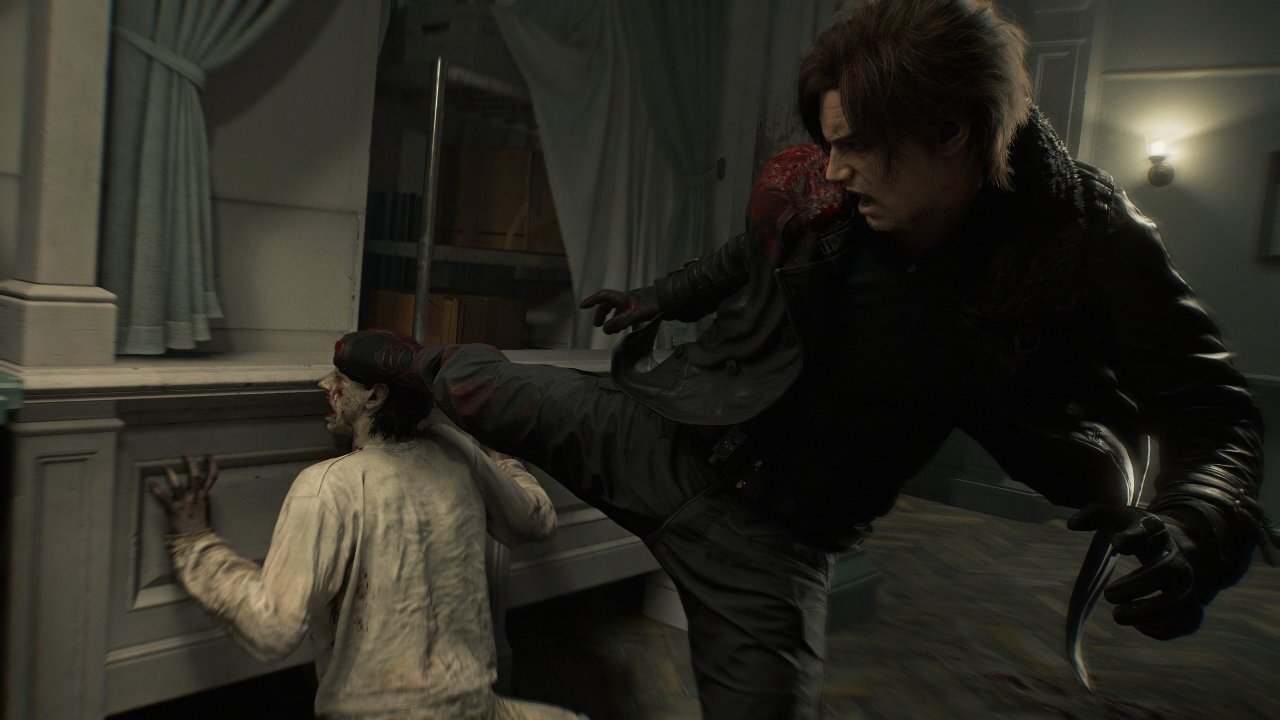
As a reference, here are some settings that affect the game and the load they add to your system:
| Settings | Low Resource Usage | High Resource Usage |
| Ray Tracing and Hair Strands | X | |
| Texture Quality, Shadow Quality, and Mesh Quality | X | |
| Lens Distortion, Depth of Field, Screen Space Reflections, Subsurface Scattering, Particle Lighting | X | |
| Contact Shadows, Ambient Occlusion, VFX Quality | X |
Players are also encouraged to take full advantage of their GPUs’ Upscaling and Frame Generation technologies, which are key features that enhance performance and visual fluidity. While these tools once carried a stigma for compromising image quality, recent advancements have significantly improved their output, especially in modern releases like Resident Evil Requiem.
RTX 3050 (Desktop) — Best settings for 60 FPS
Best Settings
- Base preset: High (gives the best balance of visuals and performance).
- Resolution: 1920×1080
- DLSS set to Balanced
- No Ray Tracing
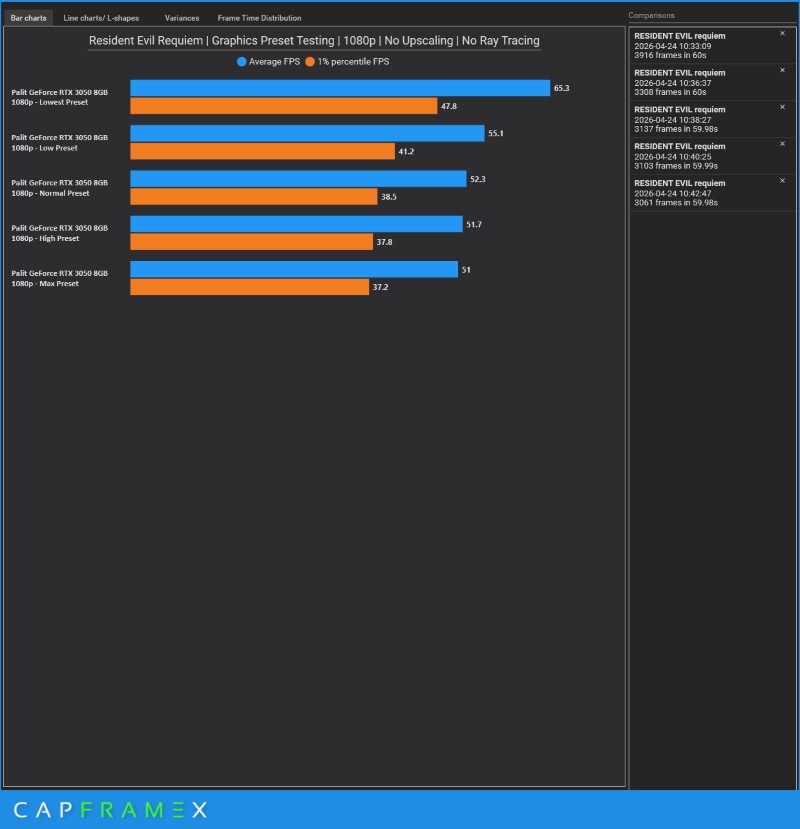
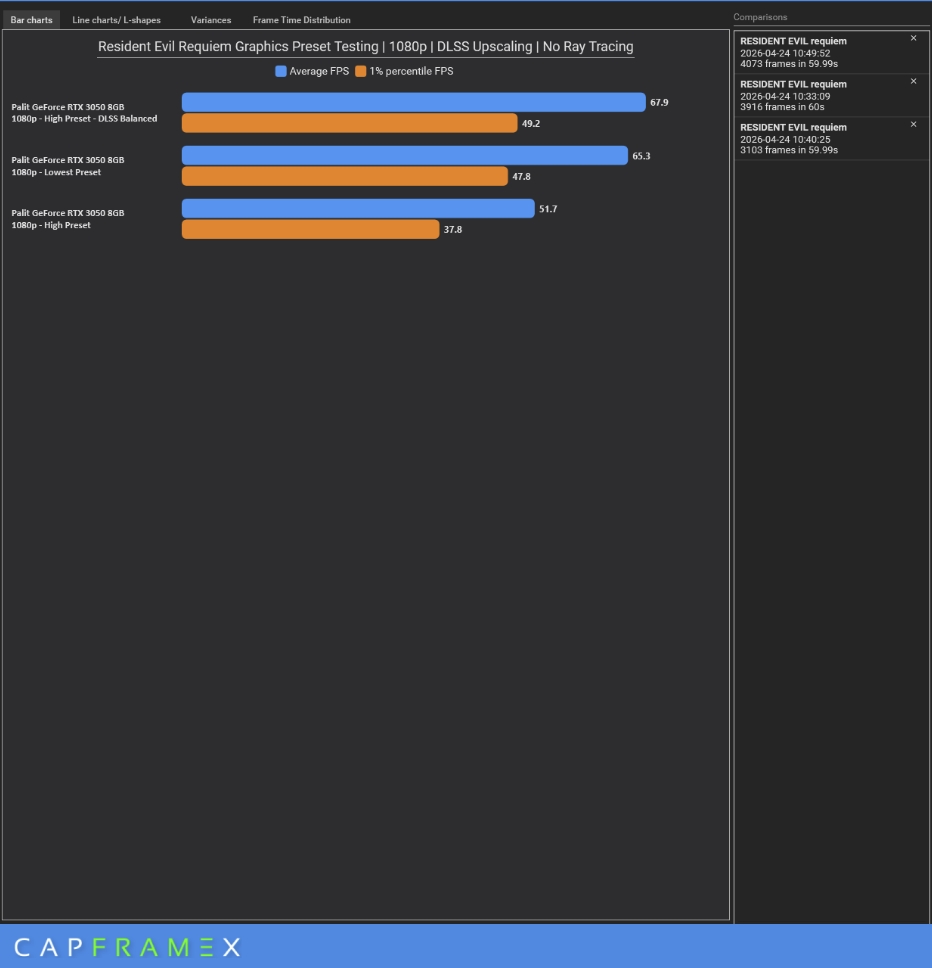
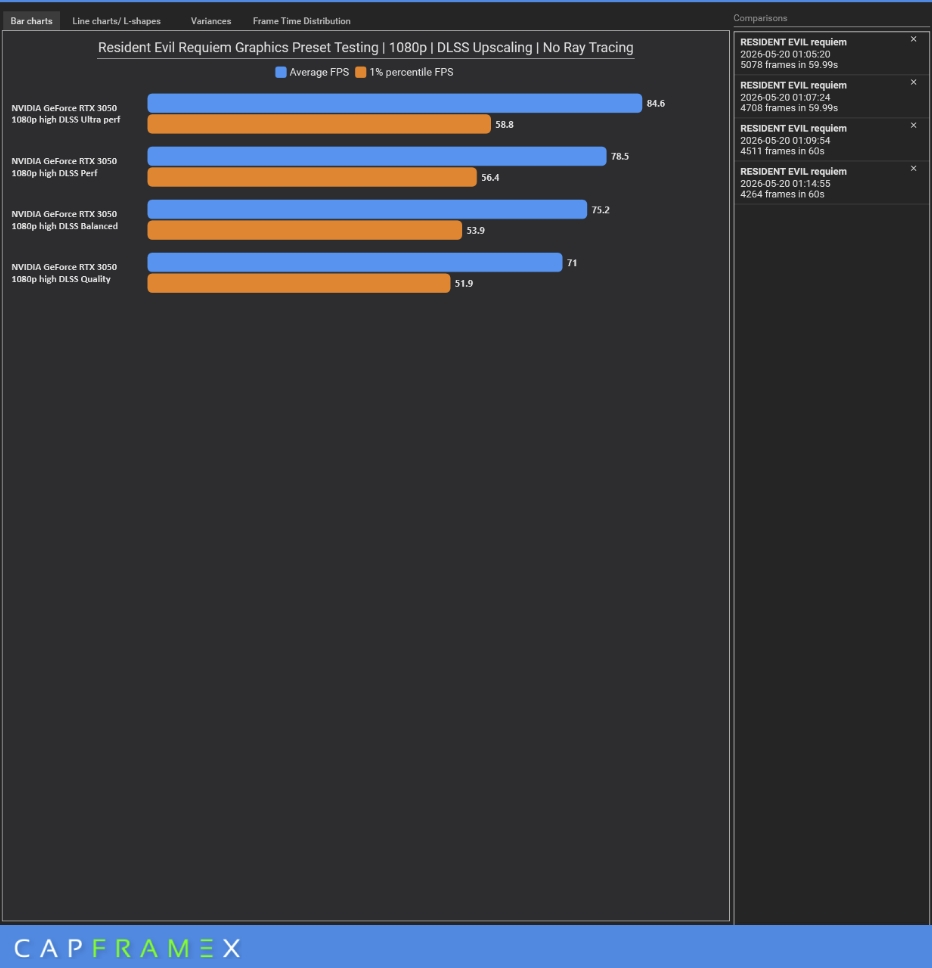
Why this combo: The RTX 3050 already averaged ~51 FPS on High without upscaling; enabling DLSS Quality or Balanced pushes you comfortably into the high 60s with minimal visual loss. While 50 FPS Average is already a stable gaming experience overall, leveraging DLSS brings our 1% Lows to 49.2 and our average frame rate to 67.9, delivering a smoother gaming experience that’s quite impressive for a graphics card of this age.
1080p Without DLSS
1080p With DLSS
RTX 4050 Laptop — Best settings for 60–90 FPS
Best Settings
- Base preset: Normal – Optimal load balance of CPU and GPU to minimize bottlenecks
- Resolution: 1920×1080
- DLSS set to Quality
- No Ray Tracing
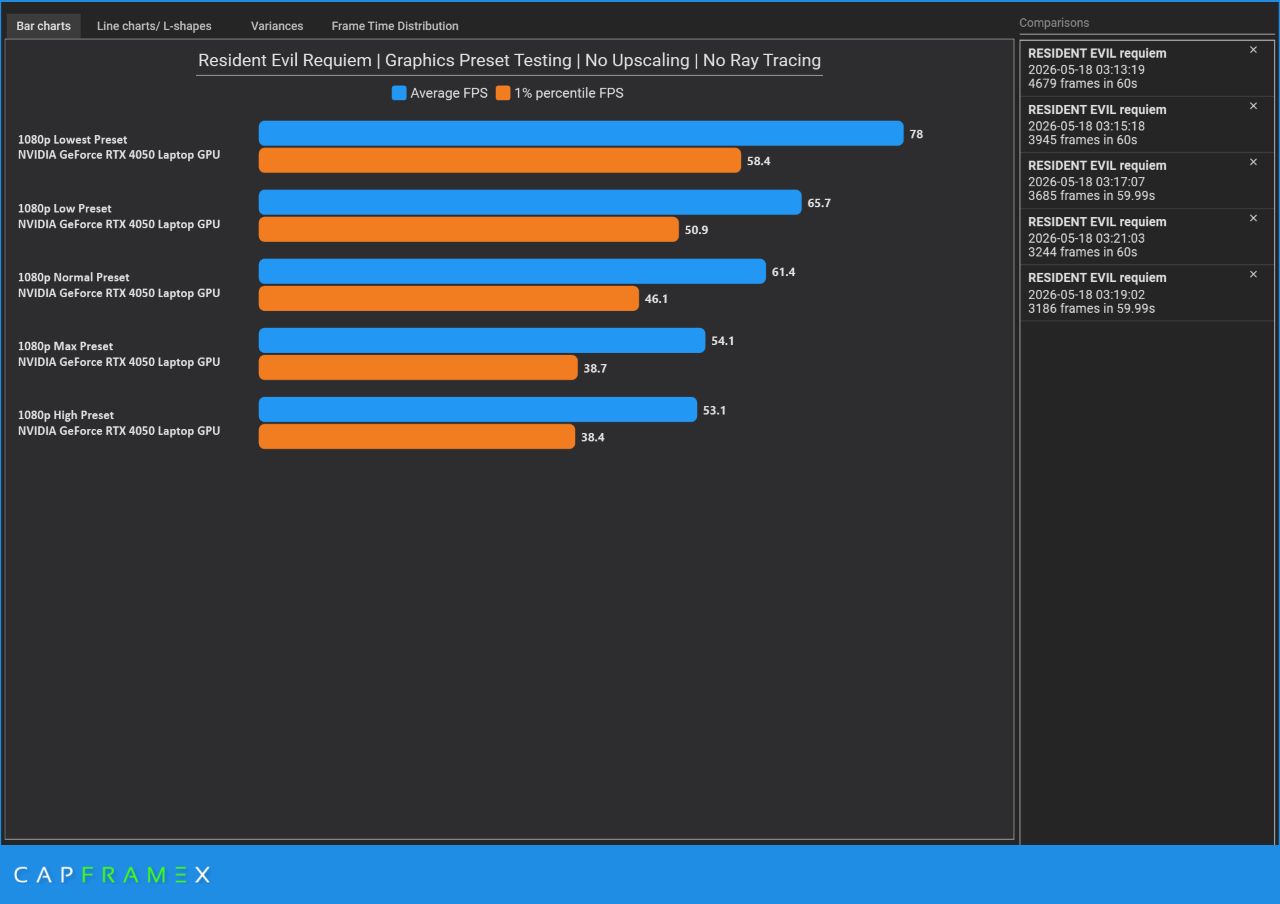
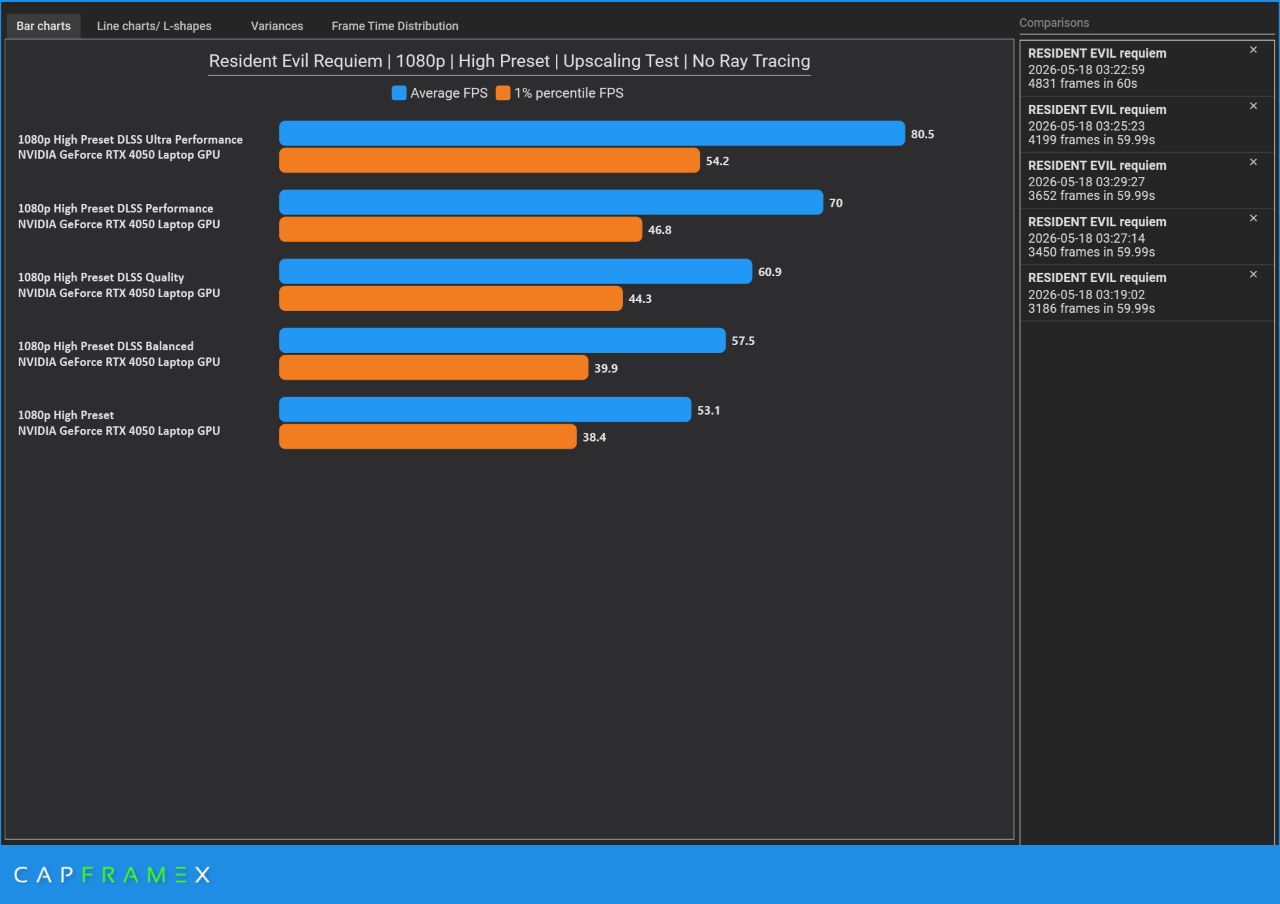
Why this combo: The RTX 4050 benefits from a modern version of Upscaling and Frame Generation, as you can keep most visual bells and whistles on and still hit 80~ FPS on many scenes, more with Frame Generation enabled. Unlike the RTX 3050, which has only 4GB VRAM, the RTX 4050’s 6GB VRAM allows for more settings tweaking outside the presets, where you could have higher textures or opt for DLSS Quality instead of DLSS Balanced + Frame Gen for higher 1% lows.
1080p Without DLSS
1080p With DLSS
ROG XBOX Ally — Best settings
Recommended target: 60 FPS at 720p upscaled to 1080p (or native 1080p with Medium settings, depending on battery/thermals).
Preset & resolution
- Base preset: Medium.
- Resolution scaling: Native 720p with upscaling to 1080p (if the game supports it) or set render scale to 70–80% for a good balance.
- No Ray Tracing
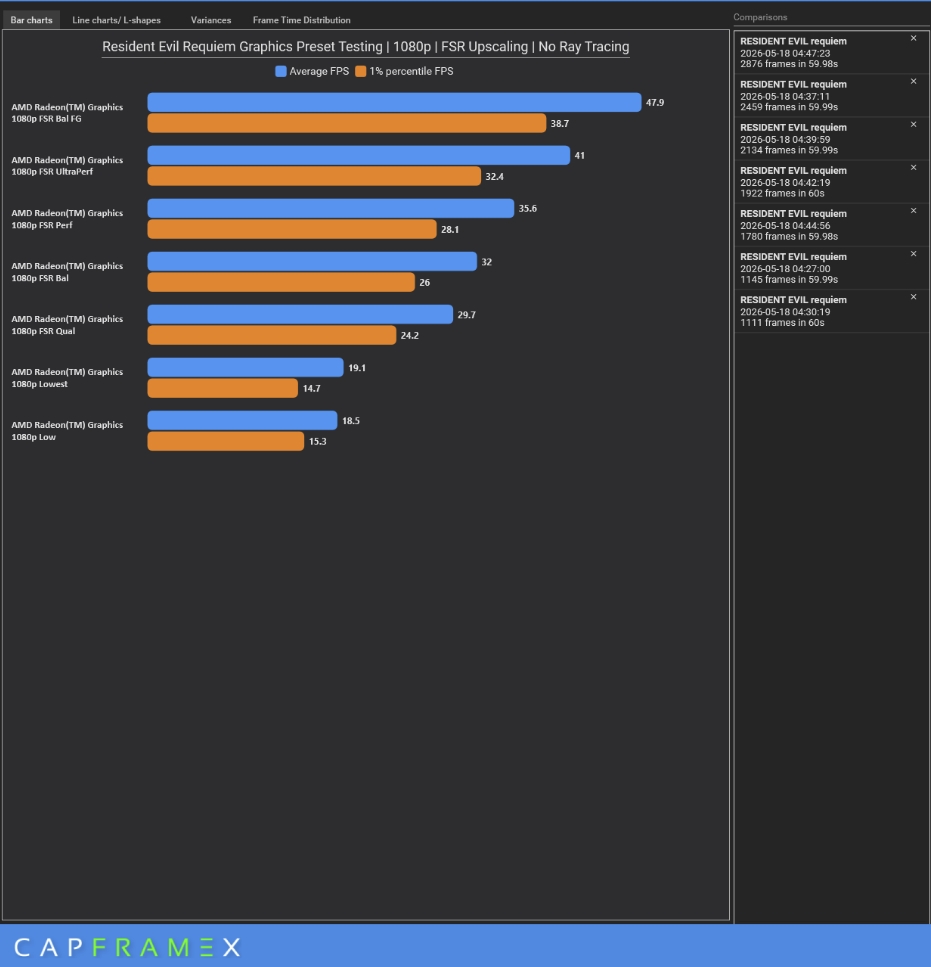
Why this combo: The ROG XBOX Ally is arguably one of the weakest Windows-based gaming handhelds in the market, with the Ryzen Z2 APU sporting only a 4-core / 8-thread configuration, meaning that even older handhelds and newly released ones are guaranteed to output higher framerates than the XBOX Ally. That said, regardless of your handheld’s specs, graphics quality matters less thanks to the high PPI (Pixels-per-inch) of the display, effectively making a 7-inch screen running at 720p/1080p on low settings look better than a 24-inch 1080p monitor at the same or a tier-preset higher.
With that in mind, as long as you’re getting above 30FPS in either Average or 1% lows in Resident Evil Requiem, you’re able to enjoy the game the same as playing on the previous two setups that we tested. You have more flexibility to toy with its thermal and power limits, lowering expensive effects, and using upscaling.
1080p With/Without FSR
Mid Tier PC(i5 14400 + RTX 3050) — Tweak Haven
Best Settings
- Base preset: High (gives the best balance of visuals and performance).
- Resolution: 1920×1080
- DLSS set to Balanced
- No Ray Tracing
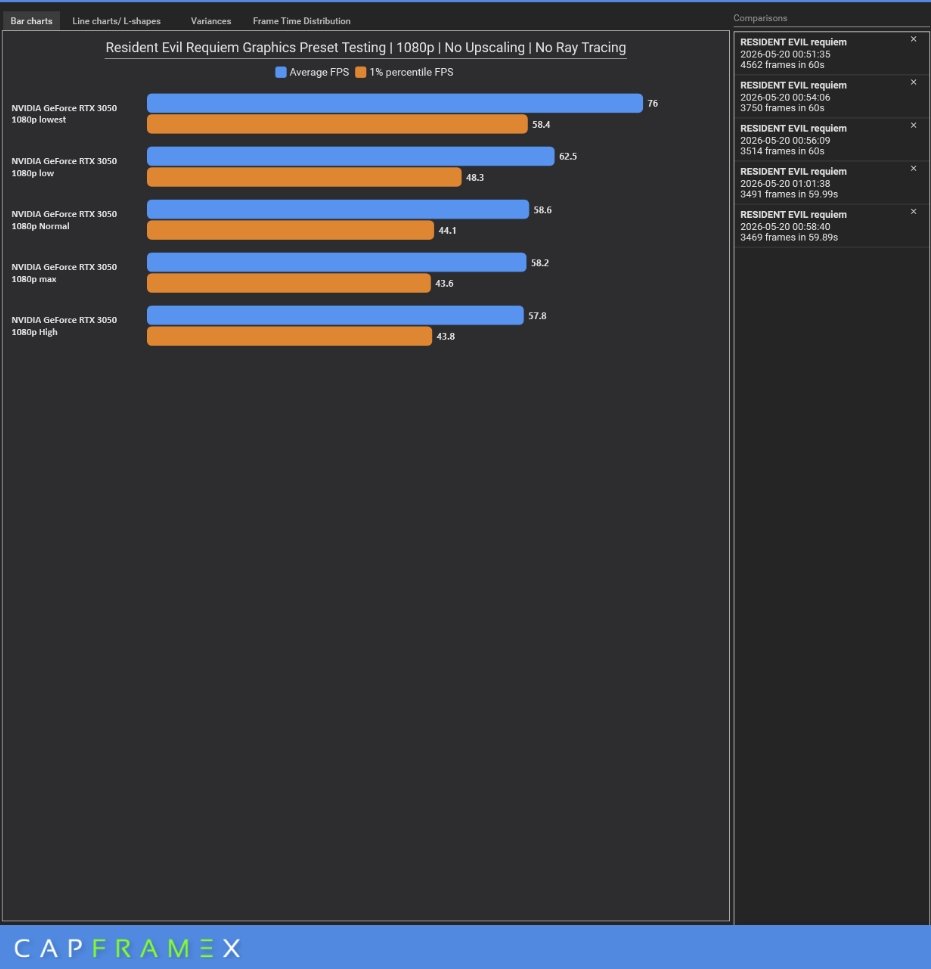
Why this combo: Low, Normal, and High Presets give a negligible performance impact as tested in our first deep dive article. Having a more capable system that’s closer to the recommended spec, like our i5 1440 + RTX 3050 combo, will close the gap between these presets, allowing us to further maximize our framerates by enabling DLSS.
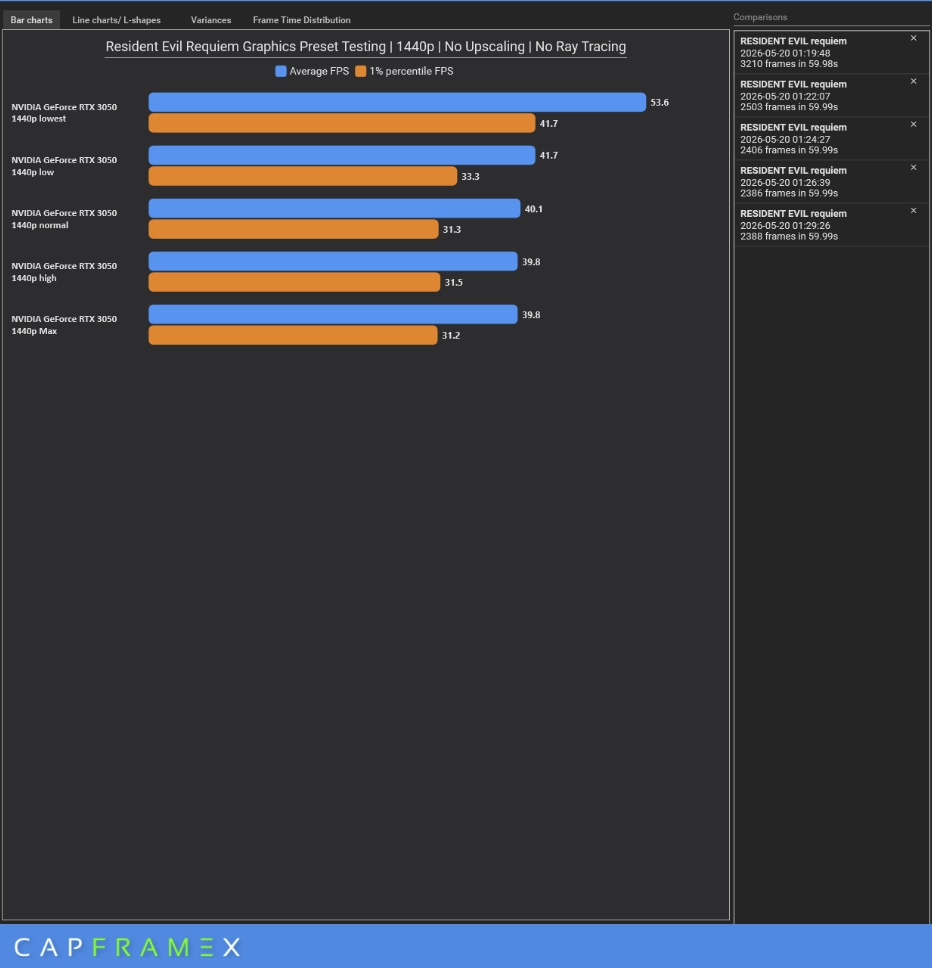
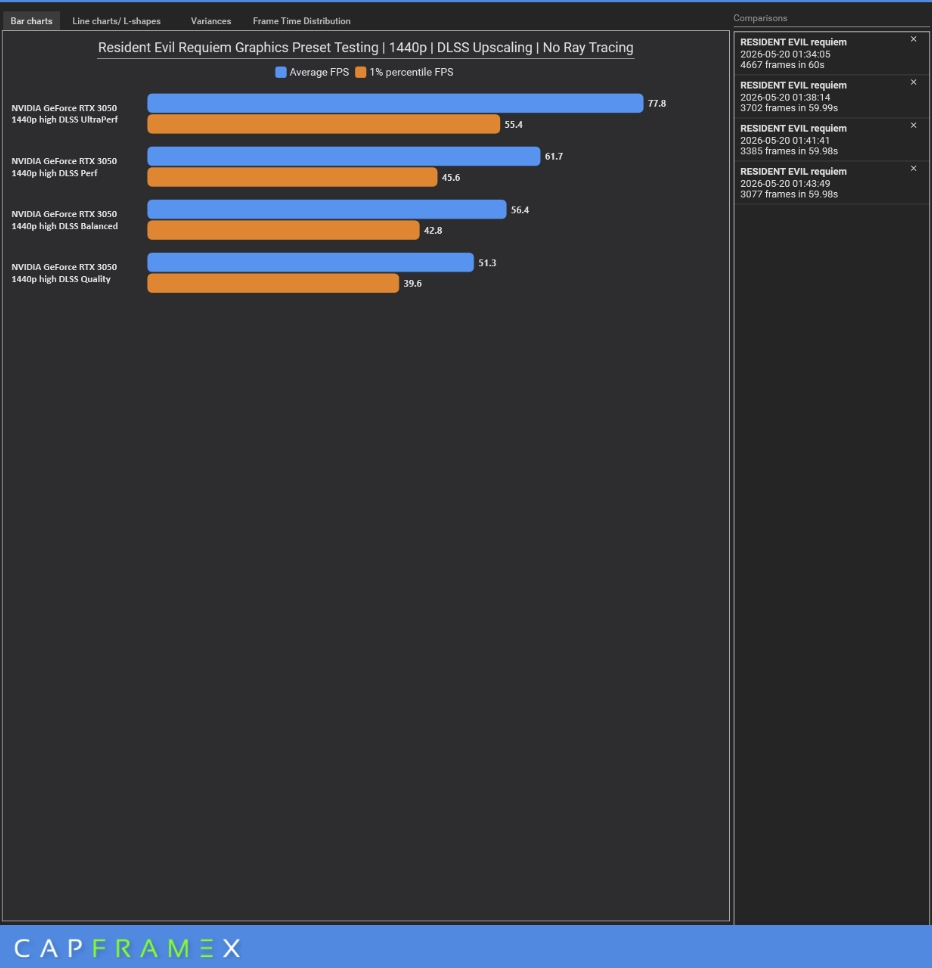
That said, despite the mid-tier setup, Resident Evil Requiem’s optimization allows this supposedly 1080p AAA mid-tier gaming pc to play the game at 1440p resolution with only little-to-no performance impact when upscaling is enabled. That is indeed noteworthy.
1080p Without DLSS
1080p With DLSS
1440p Without DLSS
1440p With DLSS
Capcom’s RE Engine continues to prove its worth, with Resident Evil Requiem being remarkably accessible and scalable across a wide range of hardware. As shown in our deep dive, the RTX 3050 can be pushed into the 60s with DLSS and sensible toggles, while 40‑series laptops can leverage Frame Generation and upscaling to reach much higher frame rates. The handheld experience is also viable with careful resolution scaling and conservative presets.
It also helps that Resident Evil Requiem is a title that can be enjoyed whether at 30 or 60 FPS. Unlike high-action or titles that require pixel-perfect reactions that would benefit from higher frames, a horror title isn’t affected as much, and while high frame performance is certainly welcome, it is not a hard requirement. In short, Resident Evil Requiem delivers a premium, atmospheric AAA experience without forcing a hardware upgrade for most players, which is a rare and welcome result in today’s market.
Resident Evil Requiem is now available on PS5, Xbox Series, Switch 2, and PC via Steam.
